The Waterfall That Won the Meeting: Mapping My Backyard's RF Fog for the HOA
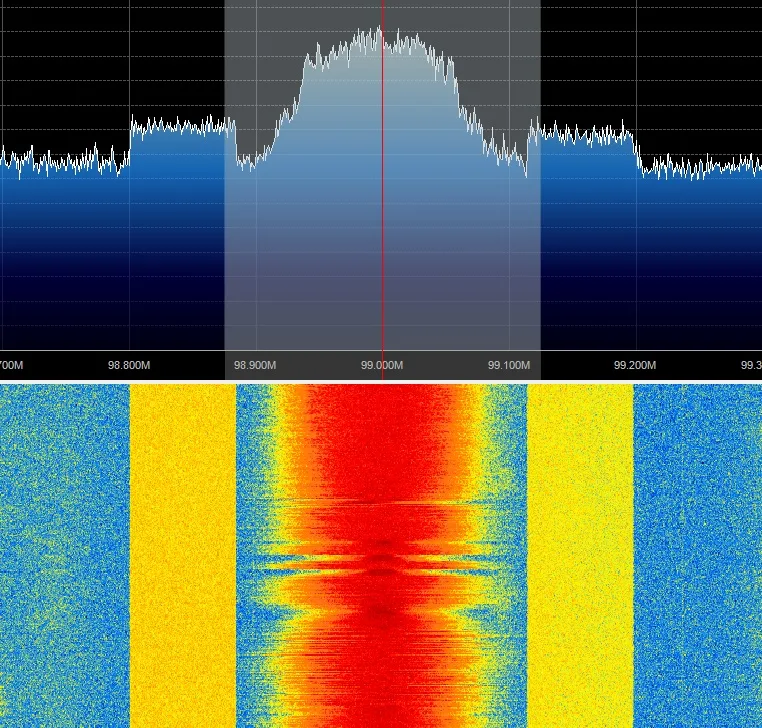
Photo: Docmarius, CC BY-SA 4.0, via Wikimedia Commons
The email from my HOA arrived on a Tuesday: my new antenna mast was 'potentially emitting harmful radiation' and needed to come down pending board review. I could have hired a lawyer. Instead, I spent a weekend with an RTL-SDR dongle and a cup of coffee, and walked into the next board meeting with something better than outrage — a map.
First, What Was Actually Floating Over My Fence
Before the meeting, I wanted to know what RF was already in the air. Not theoretically — measured. The setup cost me about $35 total:
- An RTL-SDR Blog V3 dongle (the $30 workhorse of the hobby)
- A cheap discone-style antenna on a paint pole
- SDR# with the Frequency Manager plugin, free on Windows
- A laptop, a lawn chair, and an afternoon
I swept from 24 MHz up through 1.7 GHz, logging peaks and saving waterfall screenshots at six spots around the yard. The results were humbling. My 'controversial' antenna wasn't even the loudest thing on my own property.
The Usual Suspects, Ranked
Here's what the spectrum actually looked like, from strongest to weakest:
- The neighbor's WiFi mesh node — three feet from my property line, blasting 2.4 GHz at full power to fix a dead zone in their garage
- My own router — guilty as charged, though at least it's mine
- The pool pump controller — a 900 MHz radio link I didn't know existed until it lit up the waterfall like a Christmas tree
- Two Ring cameras across the street, chattering constantly
- My antenna — a thin, quiet blip on the bands it was actually using
The punchline writes itself: the board member who filed the complaint had a mesh WiFi node transmitting more RF toward my yard than my antenna ever did toward theirs.
Turning a Waterfall Into a Argument
Raw spectrum data means nothing to civilians. So I built a simple slide deck — one screenshot per slide, annotated in plain English:
- Red boxes around signals they'd recognize: 'This is your doorbell camera'
- Green boxes for my antenna's actual footprint
- A frequency scale labeled like a ruler, not a math problem
The key slide was a comparison: 'Signal from your pool pump controller, measured at my back door' next to 'Signal from my antenna, measured at your back door.' The difference was roughly 20 dB. Nobody on the board knew what decibels meant, exactly, but everyone understood smaller bar, quieter thing.
Reading a Waterfall: The Two-Minute Version
If you've never looked at one, a waterfall is just a live heatmap of the radio spectrum. Time runs down the screen. Frequency runs across it. Bright spots are strong signals. That's genuinely the whole model.
- Horizontal lines = constant carriers, like a WiFi AP or a broadcast station
- Diagonal streaks = frequency-hopping signals, typical of Bluetooth and some mesh gear
- Wide bright blobs = broadband noise, often a cheap switching power supply or a plasma TV
- Nothing but a flat floor = a quiet band, which is what you want for receiving
Once people see their own garage door opener paint a bright streak across the screen, the fear of invisible 'radiation' tends to dissolve into curiosity. That's the whole trick: RF is scary when it's abstract and boring when it's labeled.
How the Meeting Went
I presented for eight minutes. I showed the annotated waterfalls, handed out a one-page printout titled 'What's Already Broadcasting on Your Street,' and offered to do the same survey for any board member's property, free.
The vote to approve the antenna installation passed 5–1. The lone holdout was the pool pump guy, which, fair.
If You Want to Try This
You don't need to be in an HOA dispute to find this useful. An RF survey of your own property is the best troubleshooting tool I know for flaky smart home gear — half the 'my Zigbee devices drop out' complaints I hear are really 'my neighbor bolted a WiFi extender onto the shared fence.'
Total damage: an RTL-SDR, free software, and one afternoon. Cheaper than a lawyer, and unlike a lawyer, it also finds your noisy pool pump.