Read the Sticker Before You Plug It In: How I Vet Cheap Gadgets With the FCC Database
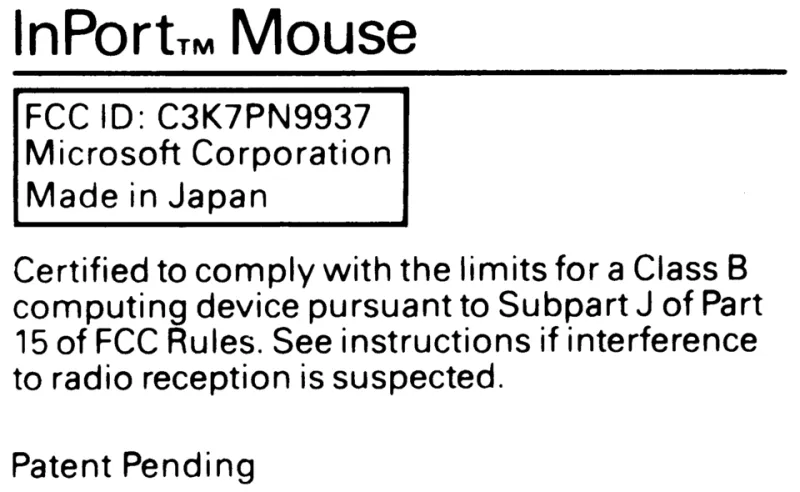
Photo: Tony Dwyer, CC BY-SA 4.0, via Wikimedia Commons
Every gadget sold in the US with a radio inside — Wi-Fi, Bluetooth, Zigbee, whatever — has to clear the Federal Communications Commission. And the proof of that is sitting right there on the device, usually in tiny gray type: the FCC ID.
Most people never give it a second glance. I've started treating it like a Carfax report. Before any bargain-bin smart device joins my network, I look it up. It takes five minutes, it's completely free, and it has talked me out of at least three purchases that I now firmly believe would've been trouble.
What an FCC ID Actually Tells You
An FCC ID has two parts: a three-to-five character grantee code identifying the company that got the equipment authorized, followed by a product code assigned by the manufacturer. You'll find it molded into the plastic, printed on a label, or sometimes buried in the battery compartment.
Here's the part that surprises people: the FCC doesn't test the device itself. Manufacturers either run the tests in-house or, far more commonly, pay an accredited third-party lab to verify the radio meets emission limits. The database tells you who did the testing, when, and what radio frequencies the device is allowed to use.
So when you look up an ID, you're not just confirming the thing is legal. You're learning whether the company behind it went through the proper channels — or whether that ID is copied, expired, or belongs to a completely different product.
The Walkthrough: Five Minutes in the Database
Head to the FCC's Equipment Authorization System (fda.gov is not it — you want the OET search at apps.fcc.gov/oetcf/eas). Yes, the interface looks like it was built in 2003. Power through it.
- Find the ID on the device. Use a flashlight. It's often on the bottom or inside a battery door.
- Search the grantee code first. Enter just the first chunk and hit search. This shows you every product that company has ever authorized.
- Open the grant details. You'll see the product name, the frequency bands, and the test dates.
- Download the exhibits. This is where it gets fun. Many grants include the actual test reports, internal photos, and the user manual as PDFs.
That last step is the real goldmine. Internal photos show you the actual circuit board. If the "smart plug" you're eyeing has photos revealing a board that looks like it was laid out in a hurry — no grounding, antennas dangling near mains voltage traces — you now know something the product listing will never tell you.
Red Flags I've Learned to Spot
No FCC ID at all. If a radio-equipped device has no ID, it's either not legal for sale in the US or the seller is hoping you won't check. Either way, hard pass.
A recycled ID. Search the grant and compare the product photos to what's actually being sold. I once found a "new" security camera whose FCC ID mapped to a completely different device from 2016. The seller just slapped a legit-looking number on a clone.
Modular grants used loosely. Many products use pre-certified radio modules — an ESP32 module, for example, carries its own modular approval. That's normal and fine. But check that the host device's grant actually exists too if it has its own enclosure and label. Sloppy paperwork upstream often means sloppy engineering downstream.
Test reports that don't match the bands. If a device claims Wi-Fi and Bluetooth but the grant only covers 2.4GHz Wi-Fi, something's off. Every radio mode should be covered.
Why This Matters More for Cheap Gear
Big brands have compliance departments and reputations to protect. A $9 no-name plug from an overseas marketplace? The incentive structure is very different. The FCC does issue fines and recalls, but enforcement is a drop in the ocean compared to the volume of gear flowing through e-commerce sites.
The compliance file is your one independent window into what's actually inside. It won't catch everything — it says nothing about the companion app siphoning your contact list — but it does tell you whether the radio hardware meets emission limits and whether the company cared enough to document it.
My Actual Buying Flow Now
Before ordering any off-brand smart device: find the FCC ID in the listing photos (legit sellers often show it), run the search, skim the internal photos and test report, and only then decide. If a listing won't show the label, I ask the seller. No answer, no sale.
It sounds nerdy. It is nerdy. But it's also the closest thing we have to a background check for gadgets — and it costs you nothing but a few minutes and the patience to navigate a government website that desperately needs a redesign.
Your smart home is only as trustworthy as the sketchiest device on it. Check the sticker.