Eight Copper Wires, Zero New Drywall: My House Was Already Wired for Sensors
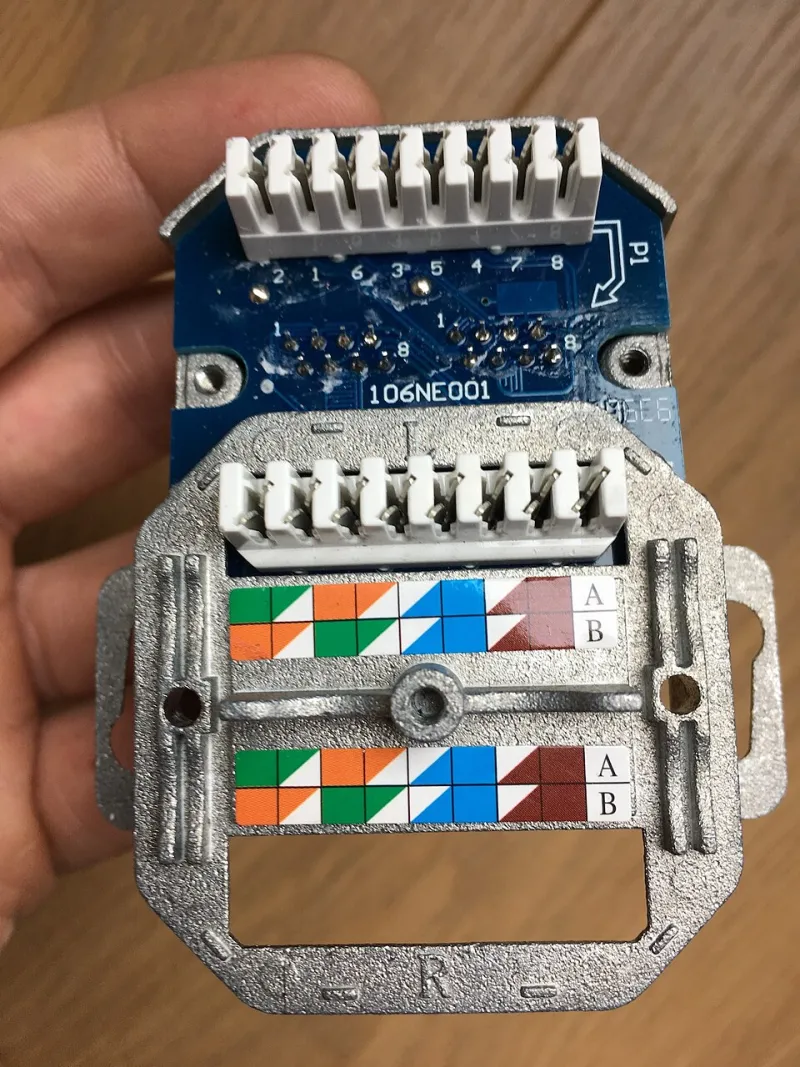
Photo: 2pem, CC BY-SA 4.0, via Wikimedia Commons
When I bought my house, the previous owner left behind a small mystery: a bundle of Ethernet cables snaking out of the wall in the den, labeled in fading marker with room names that didn't match anything in my floor plan. The router was long gone. The runs, though, were still there — eight copper wires each, running through the walls to dead keystone jacks in four rooms.
Most people would yank them out. I grabbed a multimeter instead.
First, Figure Out What You Actually Have
Legacy Ethernet is one of the most common forms of hidden infrastructure in American homes. Builders wired up offices and media rooms in the 2000s, then Wi-Fi killed the need for most of it. The cable stays. It's a shame, because a Cat5e run is a genuinely useful thing: four twisted pairs of 24-gauge copper, rated to carry low-voltage signals a hundred meters.
Before you dream about sensor runs, verify the cable is real and intact. Not everything behind a wall plate is Ethernet — phone line uses similar-looking Cat3, and some installers ran cheap CCA (copper-clad aluminum) cable that's barely worth using as a pull string.
My test kit:
- A cheap continuity tester, or just a multimeter in continuity mode
- A bare Ethernet plug and a crimp tool to terminate one end
- Ten minutes per run
Strip the far end, short pins 1 and 2 together, then go back to your patch panel side and check resistance across the corresponding pair. If it beeps, you've got a continuous run. Repeat for all four pairs. CCA cable will read noticeably higher resistance than pure copper — if a 100-foot run measures more than about 15 ohms per pair, be suspicious.
Powering Sensors Over Old Cable
Here's the fun part. Ethernet carries Power over Ethernet in commercial buildings every day, and while we're not going to run real 802.3af PoE on legacy residential cable, we can borrow the concept in a safer, dumber way.
An ESP32 sensor node draws 80–250mA in active Wi-Fi mode, far less if you use an ESP8266 or put the radio to sleep. Feed that from a 5V wall adapter at the wiring closet, split across two pairs (positive on the blue pair, ground on the brown pair, say), and you've got a wired sensor node with no battery to babysit.
Some guidelines I learned the hard way:
- Keep voltage at 5V or below. 12V on thin 24AWG pairs invites trouble, and if you ever short a pair against something conductive, lower voltage means lower drama.
- Use one pair for power, one pair for your data signal (like a one-wire bus to a DS18B20 temperature sensor), and leave the rest unused or as spares.
- Fuse it. A $2 inline fuse holder at the power supply protects the whole run.
- Don't power multiple long runs from one adapter without doing the voltage-drop math. At 24AWG, resistance adds up: roughly 8 ohms per 100 feet per conductor, and current flows through both conductors of the pair.
My living room run is about 70 feet, powering an ESP32 with a BME280 and a motion sensor. Measured drop at the far end: about 0.4V. The ESP32's onboard regulator doesn't care.
Where Wired Beats Wireless (Even in 2024)
I'll be honest — I went into this expecting it to be a fun hack and came out a convert. Three things surprised me:
Reliability. My battery-powered Zigbee and Wi-Fi sensors drop offline a few times a year, usually during firmware updates or router reboots. The wired nodes have not dropped once in eight months. A hardwired power feed means no battery voltage sag in cold garages, no dead sensor discovered during a heat wave.
Placement freedom. Battery constraints push you toward big enclosures and convenient locations. Wired nodes can hide inside ceiling fixtures, behind books, inside the attic access panel — anywhere the cable already reaches.
Cost. A battery-powered sensor node costs $8–12 in parts plus a battery you'll replace. My wired nodes cost about $6 each: an ESP32 clone, a sensor, a small buck board. The cable was free. The power supply at the closet feeds eight runs.
The Corners Where It Gets Awkward
This isn't all sunshine. Some things to know before you commit a weekend:
- You're stuck with the cable's endpoints. If there's no run to the bathroom, no amount of cleverness gets you a bathroom sensor. I ended up supplementing with two battery nodes in rooms the old owner never wired.
- Old terminations can be sneaky. One of my runs had a punch-down junction box in the attic where someone spliced in a shorter cable. The continuity test caught it; my first power-up attempt did not.
- Label everything at both ends. Painter's tape and a Sharpie now saves you an hour of tone-tracing later.
- Check local code if you're running new cable through walls. Using existing low-voltage runs for more low-voltage stuff is generally fine, but anything new should be CL2/CL3 rated.
The Build, Summarized
For each run: terminate one end into a keystone or plug, connect the far end to your sensor node's power input through a fuse, feed the closet side from a quality 5V supply sized for all your runs combined, and put your data line (I2C, one-wire, whatever your sensor speaks) on a spare pair. Total parts cost for my four-node system: about $45, including the power supply.
Eight months in, the wired fleet has become the backbone of my home automation — the reliable layer that everything else hangs off of. The batteries in my remaining wireless sensors now last longer too, since the critical, frequently-polled sensors moved to copper.
So before you order another pack of CR123s or drill another hole, go check your walls. There's a decent chance your house has been waiting to power your sensor fleet for fifteen years.